

pgsesame
pgsesame is declarative permission management for PostgreSQL and Amazon
Redshift. Define roles, users, groups and grants in YAML, then plan and apply
changes like Terraform: sesame plan shows exactly which statements a change
needs, sesame apply runs them, and a second plan after apply is empty.
version: 1engine: postgres            # or redshift
principals:  analyst:    type: role    privileges:      schemas:        usage: [analytics]      tables:        select: [analytics.*]
  alice:    type: user    password_env: ALICE_PASSWORD    member_of: [analyst]
pgsesame on GitHub → · On PyPI →
A GRANT leaves no trace anyone reviews. It lives in someone’s terminal history,
or in a migration nobody reads again. The catalog knows the current state but
not the intent, so you can’t tell a mistake from a decision, or answer a question
like who can see the customer emails.
pgsesame keeps the intended state in one file, so changes go through pull requests, and the pull requests show who approved each change and when. It is built on what went wrong with the earlier tools in this space, pgbedrock for PostgreSQL and redtape for Redshift, both now unmaintained:
- Read the real catalog without crashing. A production database holds things a tool doesn’t model, such as privilege letters redtape’s ACL parser rejected.
- Issue the difference, not everything. Re-issuing every declared grant on every run is noise you can’t review.
- Revoke, but only when asked. A tool that can’t revoke never converges. A
tool that revokes by default drops users nobody meant to drop. pgsesame plans
revokes and drops, and applies them only with
--allow-revokeand--allow-drop. - Cover what people really declare. Default privileges, ownership, column grants, row-level security and Redshift roles and masking aren’t edge cases.
Where it runs
Section titled “Where it runs”PostgreSQL 14 to 18 and Amazon Redshift, provisioned or Serverless. PostgreSQL services work through the same connection, as the platform’s admin role: Supabase (tested, with its built-in roles and row-level security), Amazon RDS and Aurora, Google’s AlloyDB and Cloud SQL, Neon.
pgsesame connects the way you already do: a DSN or the standard PG* variables
with a password, temporary credentials from IAM for a Redshift cluster, Serverless
workgroup, or RDS and Aurora instance, or the Data API when the database isn’t
reachable over the network.
Install
Section titled “Install”uv tool install pgsesame # installs the `sesame` commanduv tool install "pgsesame[redshift]" # Redshift through IAM or the Data APIuv tool install "pgsesame[rds]" # RDS and Aurora through IAM or the Data APIuvx pgsesame --help # or try it without installingpip install pgsesame # or into an environmentIn CI without Python, use the image (amd64 and arm64):
docker run --rm -v "$PWD:/work" -e SESAME_DSN ghcr.io/almostly/pgsesame plan permissions.yamlPlan, apply, review
Section titled “Plan, apply, review”Connect once with sesame login, then plan and apply by name. The password goes
to the operating system’s keychain, never to a file; a target with IAM or the
Data API keeps no secret at all.
sesame login prod --host db.example.com --user admin --database app   # asks for the passwordsesame login analytics --engine redshift --iam --workgroup analytics --database devsesame login aurora --iam --rds my-cluster            # RDS or Aurora: an IAM tokensesame use prod                    # the default for plan and apply
sesame validate permissions.yamlsesame plan permissions.yaml       # exit code 2 when there are changessesame apply permissions.yaml      # revokes and drops need --allow-revoke / --allow-drop
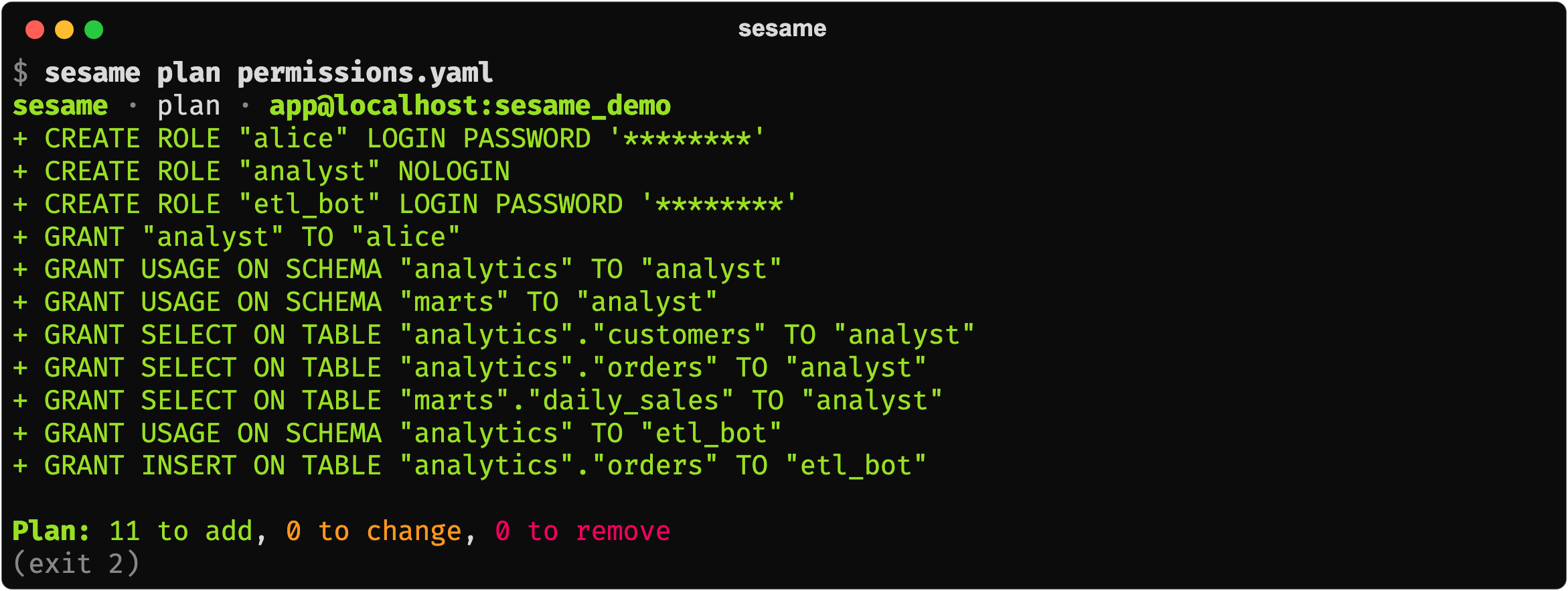
A first plan creates the roles and grants the spec declares:
Later, two grants someone made by hand show up as drift. They are planned as
revokes, and applied only with --allow-revoke:

A plan can be saved as a change set, reviewed without a database, then applied exactly, or refused if the database changed since:
sesame plan permissions.yaml -o changes.json # save the plan as a change setsesame show changes.json # review it, no database neededsesame apply changes.json # run exactly that, or refuse if it's stale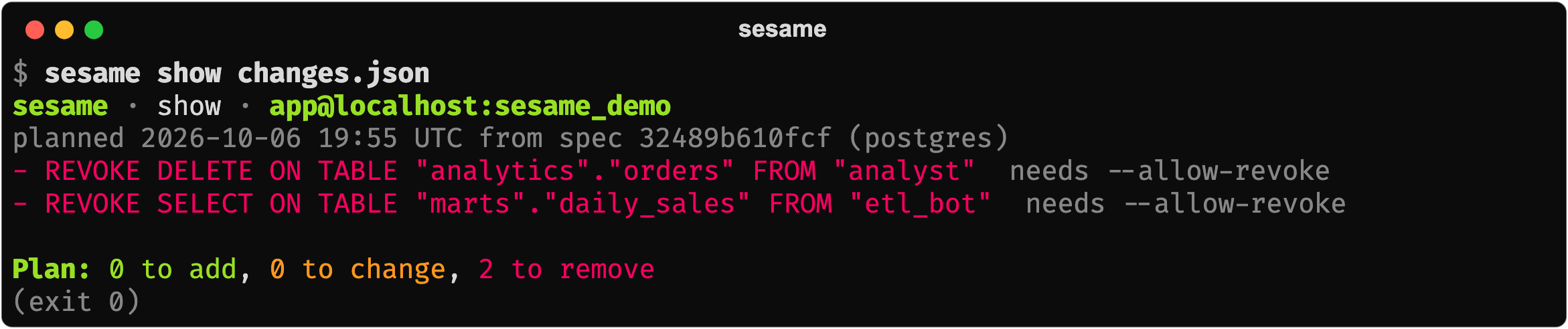
What a spec covers
Section titled “What a spec covers”- Principals. Roles, users and groups, their memberships, and privileges on
schemas, tables and single columns. Passwords never go in the spec: name an
environment variable, use IAM, or set
password: disabled. - Platform roles. Supabase’s
authenticatedor RDS’srds_iamaretype: builtin: granted to and joined, never created or altered. - Row-level security. Policies declared per table, compared in the form PostgreSQL stores them, so a re-plan after apply is empty.
- Redshift masking. Dynamic data masking per column: what everyone sees, which roles see the raw value, and which see their own mask. pgsesame works out Redshift’s priorities, and a plan after apply is empty.
- Ownership and default privileges.
ALTER ... OWNER TOfor the objects an owner lists, and default privileges so a table made overnight is readable in the morning. - Scope. A
manage:section limits comparison to the schemas and role prefixes you name, so grants elsewhere aren’t drift.
On Redshift, masking is declared as the outcome per column rather than as numbered priorities:
masking: policies: redact: {type: varchar(256), using: "'***'::varchar(256)"} email_domain: {type: varchar(256), using: "regexp_replace(value, '^[^@]+', '***')"} columns: crm.customers.email: mask: redact # everyone else unmasked: [pii_reader] # the raw value roles: support: email_domain # their own mask; later entries winAdopting an existing database
Section titled “Adopting an existing database”sesame import writes the spec that reproduces what the database grants today,
so a first plan has nothing to do, and the spec is edited from there:
sesame import --target dwh --schema collections --schema risk_engine -o permissions.yamlsesame plan permissions.yaml --target dwh # ✓ nothing to doIt writes every role but superusers and the platform’s own, their memberships, grants, column grants, default privileges, ownership and, on Redshift, masking; never passwords.
In GitHub Actions
Section titled “In GitHub Actions”Review the plan on the pull request; apply the reviewed change set on merge. The
connection comes from a secret, and a production environment can require a
reviewer’s approval before apply runs.
on:  pull_request:  push:    branches: [main]
jobs:  plan:    runs-on: ubuntu-latest    permissions: {contents: read, pull-requests: write}    env: {SESAME_DSN: "${{ secrets.SESAME_DSN }}"}    steps:      - uses: actions/checkout@v4      - uses: almostly/pgsesame@v0.2.4        with: {command: plan, spec: permissions.yaml}
  apply:    if: github.event_name == 'push'    needs: plan    runs-on: ubuntu-latest    environment: production    env: {SESAME_DSN: "${{ secrets.SESAME_DSN }}"}    steps:      - uses: almostly/pgsesame@v0.2.4        with: {command: apply}
On a pull request the plan is posted as one comment, updated on each push. On
merge, apply runs exactly the change set the plan job saved, or refuses if the
database changed since.
Testing locally
Section titled “Testing locally”The integration tests run against PostgreSQL in Docker and against oblako’s local Redshift, so a spec can be planned and applied in CI before it touches a real cluster.
Documentation
Section titled “Documentation”The full guide, the spec reference, and the design notes live in the README and DESIGN.md on GitHub. Releases are listed in the changelog.
License
Section titled “License”pgsesame is open source under the Apache License 2.0.
Subscribe to pgsesame updates
We’ll email you when pgsesame ships a new release or a notable change. No spam.